
Item List Views Interface
- Items include Materials, Tasks, Outwork, Assemblies, Costings, and related extensions.
- The various list views display specific information about items.
Navigation: Main Menu > Setup > Items
Buttons Explained
Button | Description |
View | Generates a list of items as per the selected data filters. |
Arrow on View Button | > Reset Data Filter: Resets all the data filters. |
Recent | A dropdown list of recently viewed records for quick access to those records. The button is supressed if there are no recent items. |
New | Creates a new item of the type selected from the dropdown list. The available types depend on which items were activated under General Settings. |
Prints, previews, or exports the selected report if Output Templates are added. Allows the display to be exported in .xlsx, .csv, or .htm format. | |
Edit | Allows the fields in columns with blue captions to be edited. Only available in Pricing View and the Inventory Summary. |
Actions | The Actions button differs based on the price viewed. See the individual sections for details. |
Menu | The list of views depend on which Item Types are activated and will include some or all of these options: Views
Settings
|
List View: Default
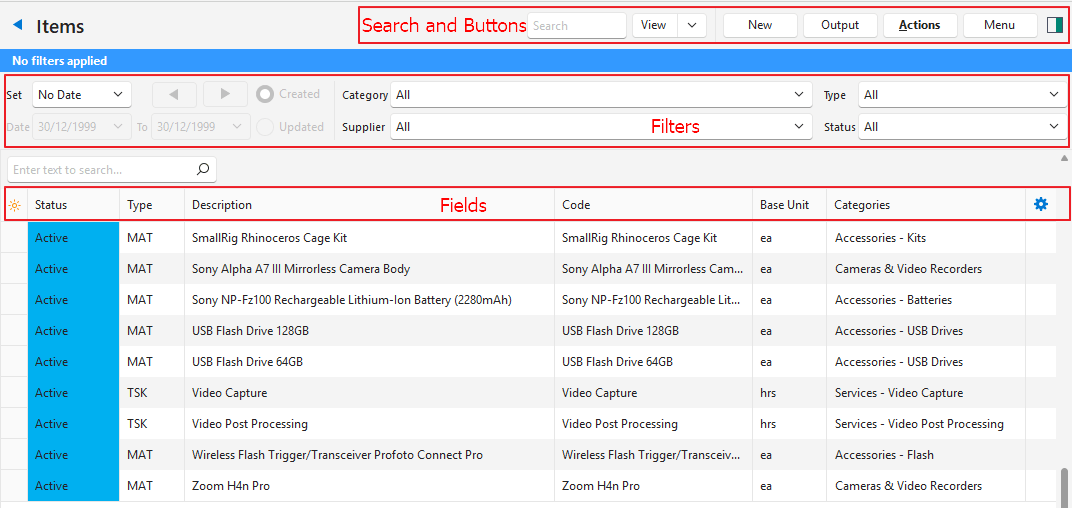
The Default View lists all the items’ header information.
Navigation: Main Menu > Setup > Items > Menu (button) > Default
Actions (button)
Available Options |
|
Filters Explained
Filter | Description |
Set | A dropdown list of date options to select one. No Date displays all the records. |
Arrows | Adjusts the dates in the direction of the arrows. |
Date | Used to customise the dates. |
Created | If selected displays transactions created on the selected date. |
Updated | If selected displays transactions updated on the selected date. |
Category | A dropdown list to select a specific category. |
Supplier | A dropdown list to select a specific supplier. |
Type | A dropdown list to select a specific item type. |
Status | A dropdown list to select a specific status. |
Fields Explained
Field | Description |
Field Chooser (*) | Used to add or remove columns. |
ID | The system-generated number for the item. |
Library ID | The item’s number in the online library. |
Status | The item’s status. |
Type | An abbreviation indicating the type of item. |
Description | The item’s description. |
Code | The item’s code. |
Base Unit | The item’s base unit. |
Categories | The item’s categories. |
Inventory | The inventory locations where the item is stored. |
Override | A checkbox. If checked the description and code can be edited (in Edit View). |
Languages | A code indicating the item’s primary language. |
Created | The date on which the item was created. |
Updated | The date on which the item was last updated. |
Updated By | The user who last updated the item. |

| A submenu with the following options:
|
List Views: Estimating
- There are two estimating views: Tasks and Outwork.
- Only items where Estimating Attributes are added are displayed.
- The estimating views include columns for Estimating Attributes.
- All estimating services are included regardless of whether they are filled in on a Costing (tab) or created as a task (service item).
Navigation: Main Menu > Setup > Items > Menu (button) > Estimating (Services) or Estimating (Outwork)
Filters Explained
Filter | Description |
Category | A dropdown list to select a specific category. If a main category is selected, all its subcategories are included. Alternatively, a subcategory can be selected which displays only items in that subcategory. |
Fields Explained: Estimating Tasks and Estimating Outwork
Field | Description |
Field Chooser (*) | Used to add or remove columns. |
ID | The system-generated number for the item. |
Status | The item’s status. |
Type | An abbreviation indicating the type of item. |
Costing | The name of the linked costing. |
Code | The item’s code. |
Base Unit | The item’s base unit. |
Categories | The item’s categories. |
Qty Type | The item’s Quantity Type. |
Qty | The quantity of the item included in the task or service. |
D | A checkbox. If checked the item’s description is added to the Estimate’s Description. |
Setup (hrs) | The number of hours it takes to set up the service. Only applies to tasks. |
Speed | The speed at which the service can be performed. Only applies to tasks. |
Adj% | The percentage by which the price is adjusted. |
Cost Centre | The item’s Cost Centre. Only applies to tasks. |
Supplier | The supplier performing the outwork. Only applies to outwork. |
Fixed Cost | The item’s fixed cost. |
Unit Cost | The item’s unit cost. |
Min Cost | The item’s minimum cost. |
Created | The date on which the item was created. |
Updated | The date on which the item was last updated. |
Updated By | The user who last updated the item. |
|
| A submenu with the following options:
|
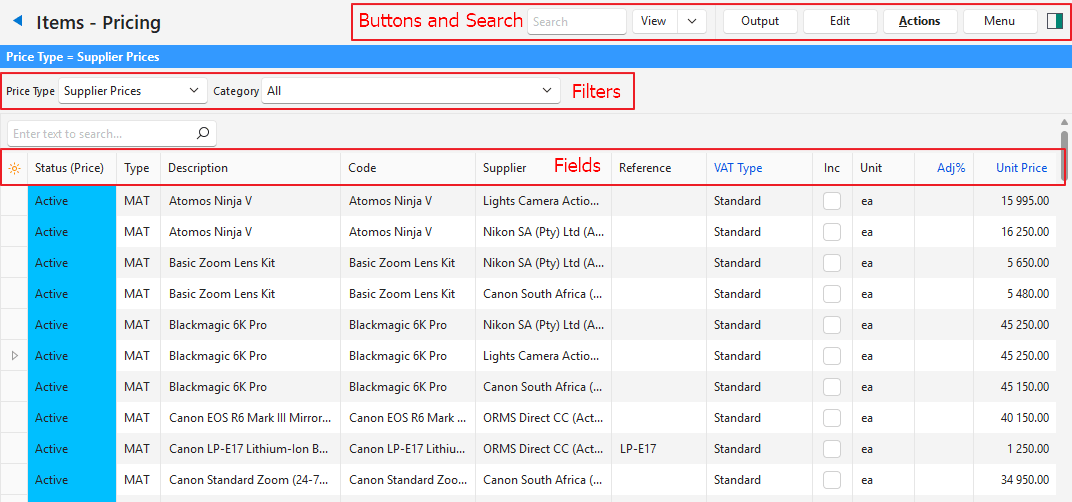
List View: Pricing
- Only items with prices are displayed in the Pricing View.
- Fields with blue captions are editable.
- Prices can also be edited in bulk using Batch Updates.
- Double-click an item to open it.
Navigation: Main Menu > Setup > Items > Menu (button) > Pricing
Actions Button
Selected Price | Available Options |
Supplier Prices | Batch Update: Updates all the selected records. The options are:
|
Cost Prices | Batch Update: Updates all the selected records. The options are:
|
Sell Prices (Materials) Sell Prices (Tasks) |
|
Price Lists |
|
Filters Explained
Filter | Description |
Price Type | A dropdown list to select one of these options:
|
Category | A dropdown list to select a specific category. If a main category is selected, all its subcategories are included. Alternatively, a subcategory can be selected which displays only items in that subcategory. |
Price List | A dropdown list to select a specific price list. Only available when Price Lists is selected under Price Type. |
Fields Explained: Supplier and Cost Prices
Field | Description |
Field Chooser (*) | Used to add or remove columns. |
ID | The system-generated number allocated to the price. |
Status (Price) | The price’s status. |
Item ID | The system-generated number allocated to the item. |
Status (Item) | The item’s status. |
Item Type | An abbreviation indicating the type of item. |
Categories | The item’s categories. |
Description | The item’s description. |
Code | The item’s code. |
Price From | Where the price is derived from (e.g. Costing, Supplier). Only applies to cost prices. |
Supplier | The supplier’s name for the supplier price. |
Reference | The reference next to the supplier price on Prices (tab). |
Barcode | The item’s barcode. |
Currency | The quantity of the item included in the task or service. Only applies to Supplier Prices. |
VAT Type | The VAT Type selected for the item. |
Inc | A checkbox. If checked the price includes VAT. |
Unit | The price’s unit. |
Adj% | The percentage by which the price is adjusted. Negative percentage indicate the price is discounted. |
Fixed Price | The item’s fixed cost price. |
Unit Price | The item’s unit cost price. |
Round | Checkbox. If checked, the price is rounded up. |
Total (Base Unit) | The item’s cost price in the base unit. |
Created | The date on which the price was created. |
Updated | The date on which the price was last updated. |
Updated By | The user who last updated the price. |
Fields Explained: Sell Prices (Materials and Tasks) and Price Lists
Field | Description |
Field Chooser (*) | Used to add or remove columns. |
ID | The system-generated number allocated to the price. |
Item ID | The system-generated number allocated to the item. |
Status (Item) | The item’s status. |
Status (Price) | The price’s status. |
Item Type | An abbreviation indicating the type of item. |
Categories | The item’s categories. |
Price List | The price list that the price belongs to. (Only available if Price Lists are selected as the Price Type.) |
Description | The item’s description. |
Code | The item’s code. |
Price From | Where the price is derived from (e.g. Cost Price). If the field is blank the price is manually entered. |
Supplier | The supplier’s name for the supplier price. |
Reference | The reference next to the supplier price on Prices (tab). |
Barcode | The item’s barcode. |
Currency | The quantity of the item included in the task or service. |
VAT Type | The VAT Type selected for the item. |
Inc | A checkbox. If checked the price includes VAT. |
Unit | The price’s unit. |
Fixed Cost | The item’s fixed cost. |
Unit Cost | The item’s unit cost. |
Adj% | The percentage by which the price is adjusted. A negative percentage indicates the price is discounted. |
Profit | The profit to be earned by using this price. (Fixed Sell Price + Unit Sell Price – Unit Cost Price – Fixed Cost Price) |
Fixed Price | The item’s fixed sell price. |
Unit Price | The item’s unit sell price. |
Round | Checkbox. If checked, the price is rounded up. |
Total (Base Unit) | The item’s sell price in the base unit. |
GM% | Gross margin percentage earned on the price. (Profit as a percentage of the price.) |
Created | The date on which the price was created. |
Updated | The date on which the price was last updated. |
Updated By | The user who last updated the price. |
List View: Substrate (Sheets) and Substrate (Reels)
- Navigation: Main Menu > Setup > Items > Menu (button) > Substrate (Sheets)
- Navigation: Main Menu > Setup > Items > Menu (button) > Substrate (Reels)
Filter Explained
Filter | Description |
Category | A dropdown list to select a specific category. If a main category is selected, all its subcategories are included. Alternatively, a subcategory can be selected which displays only items in that subcategory. |
Fields Explained
Field | Description |
Field Chooser (*) | Used to add or remove columns. |
ID | The system-generated number for the item. |
Status | The item’s status. |
Description | The item’s description. |
Code | The item’s code. |
Override | A checkbox to override the description. Only applicable to items such as substrates where the description is automatically created. |
Base Unit | The item’s base unit. |
Categories | The item’s categories. |
Name | The name of the substrate. |
Colour | The substrate’s colour. |
Grain / Flute | The Grain/flute of the substrate if applicable. |
gsm | The substrate’s Grams per Square Metre. |
Calliper | The substrate’s Calliper. |
Depth | The substrate’s Depth. |
Width | The substrate’s Width. |
Allow Rotate | A checkbox. If checked, the substrate can be rotated for printing purposes. |
Created | The date on which the item was created. |
Updated | The date on which the item was last updated. |
Updated By | The user who last updated the item. |
List View: Inventory Summary
- The Inventory Summary lists the inventory items, their locations, and applicable quantities.
- Fields with blue captions are editable.
- Negative stock quantities are set to zero for purposes of calculating the value of inventory held.
- If an inventory price is not entered, the item’s cost price is used.
Navigation: Main Menu > Setup > Items > Menu (button) > Inventory Summary
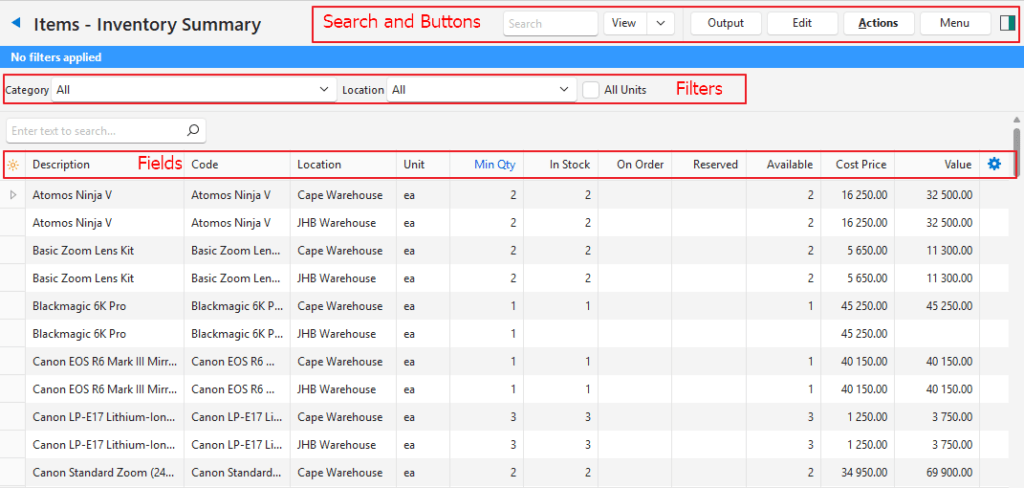
Filters Explained
Filter | Description |
Category | A dropdown list to select a specific category. If a main category is selected, all its subcategories are included. Alternatively, a subcategory can be selected which displays only items in that subcategory. |
Location | A dropdown list to select a specific location. |
All Units | Checkbox. If checked all the item’s units are displayed. The fields in blue cannot be edited if the checkbox is checked. |
Fields Explained
Field | Description |
Field Chooser (*) | Used to add or remove columns. |
ID | The system-generated number for the inventory item. |
Item ID | The system-generated number for the item. |
Location ID | The system-generated number for the location. |
Status (Item) | The item’s status. |
Description | The item’s description. |
Code | The item’s code. |
Categories | The item’s categories. |
Inventory | The inventory locations where the item is stored. |
Status (Location) | The location’s status. |
Location | The location’s name. |
Base Unit | The item’s base unit. |
Unit | The unit of the entry. |
Min Qty | The minimum quantity that you want to keep in stock. |
In Stock | The quantity in stock. |
On Order | The quantity that has been ordered but not yet received. |
Reserved | The quantity that has been reserved for orders. |
Available | The quantity that is currently available. |
Cost Price | The item’s cost price. |
Stock Price | The item’s stock price. |
Value | The value of the stock on hand (quantity x stock price). If there is no stock price entered, the cost price is used to calculate the value. |
Created | The date on which the item was created. |
Updated | The date on which the item was last updated. |
Updated By | The user who last updated the item. |
|
| A submenu with the following options:
|
Learn More
- Item Extension Types: Explains the types of items that are available.
- Item Prices Explained: Explains the various prices and how they are calculated and applied to transactions.
- Item Creation and Editing Interface: Explains the interface from which items are created.
- Item Creation and Editing Tutorials: These tutorials explain how to create items.
- Item List Views Tutorials: These tutorials explain the various reports (List Views) and functions available when viewing item lists.
- Item Categories: Explains what categories are, the interface, and how to use them.
- Item Attributes: Explains the item attributes that are available, their purpose, and how to use them.
- Item Summary: Explains the item summary sections and how to use the functions available from the summary.
- Item: Print Costing Example: An example of an item that has a costing for a print project.
- Inventory Terms and Information: Explains the inventory terms and settings used.
- Inventory and Transaction Types: Explains how inventory integrates with transactions and how the Resolve function is used.
- Inventory Recording Methods: Explains inventory recording methods like the perpetual and periodic methods.
- Inventory Replenishment Report: Explains the interface for inventory replenishment.
- Inventory Replenishment Tutorials: Explains how to activate and use the inventory-replenishment features.