
Bank Profiles
A Bank Profile is needed to import bank entries from a bank statement. The supported formats are .ofx, .csv, and .txt.
Navigation: Setup > Accounting > Bank Profiles (tab)
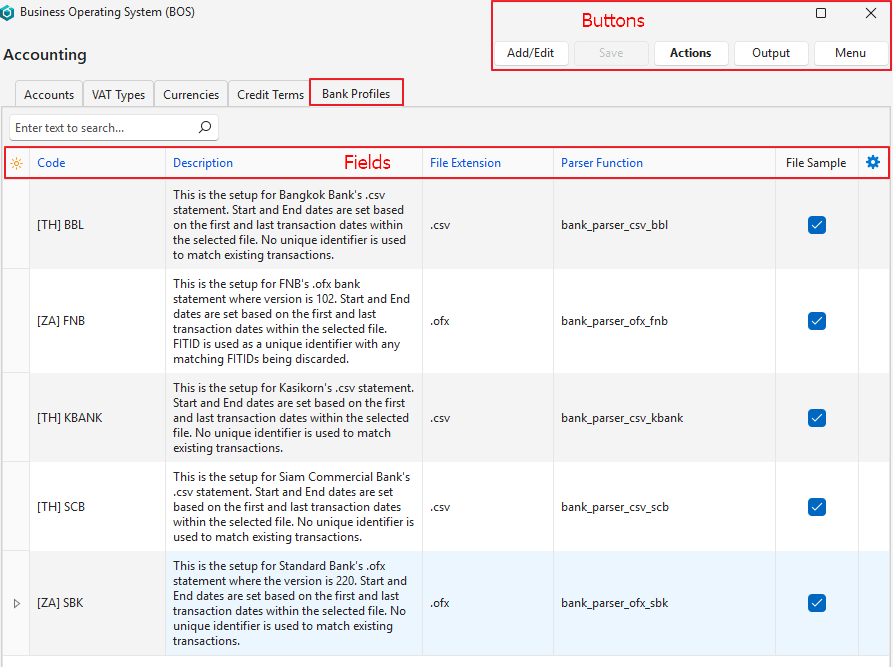
Buttons Explained
| Button | Description |
|---|---|
| Add/Edit | Allows a new bank profile to be edited or created. |
| Save | Saves any changes. |
| Actions | Download Bank Profiles from Master: Lists the available bank profiles that can be downloaded for selection. |
| Output | Allows the list to be exported (not currently active). |
| Menu | Layout |
Fields Explained
| Field | Description |
|---|---|
| ID | The system-generated number allocated to the entry. |
| Code | The entry’s brief description. |
| Description | The entry’s full description. |
| File Extension | A dropdown list to select one of these extensions: .ofx .csv .txt |
| Parser Function | A dropdown list to select a parser function. |
| File Sample | Checkbox. If a file sample is uploaded, the block is automatically checked. |
| Created | The date on which the entry was created. |
| Updated | The date on which the entry was last updated. |
| Updated By | The user who last updated the entry. |
| Widget | A submenu with the following functions: – Upload Sample File – Download Sample File – Delete Bank Profile |
Tutorials
How to Create a Bank Profile
This procedure assumes the applicable Parser file has been created and uploaded to the Master database.
- Navigate to Bank Profiles.
- Click Actions (button) > Download Bank Profiles from Master.
- Click the profile on the list.
- Click Select (button).
Technical Information: Parser Files
- Create a Postgres function to parse the bank files and update the Bank Import table. The function is created according to this format:
- Name = bank_parser_[file_extension][bank_name]: The lookup searches for functions starting with bank_parser_
- Input Parameter = (bank_header_id integer)
- Once created, upload the file, including notes on how it works to the Master DB
Guidelines for bank_parser_… function:
- A Country Code (e.g. [ZA] for South Africa, [TH] for Thailand) must be prefixed before the bank code (e.g. [ZA] FNB).
- The function should verify the Bank Account Number that must be contained in the linked Bank Account’s Lookup field. If the verification fails, return an error message.
- If the export file contains a unique ID (e.g. FITID in FNB .ofx file), this value is saved to the bank_id field and is used to check for duplicate transactions in the bank_items table. The function must set the Start and End Dates.
- If the export file does not contain a unique ID, the bank_id field should be left blank, only transactions that are dated on or after the Start Date must be imported and the function must set the End Date.
Learn More
- Bank Imports: Importing entries from a bank account.
- Bank Reconciliations: Bank recon interface and tutorial.