
Inventory Replenishment Interface
The Inventory Replenishment report can be added as a standalone module to any menu group. It can also be accessed from any transaction type that has activated the applicable setting.
This report is used to view the stock that must be ordered, edit the stock prices and change the minimum quantity of stock that should be on hand.
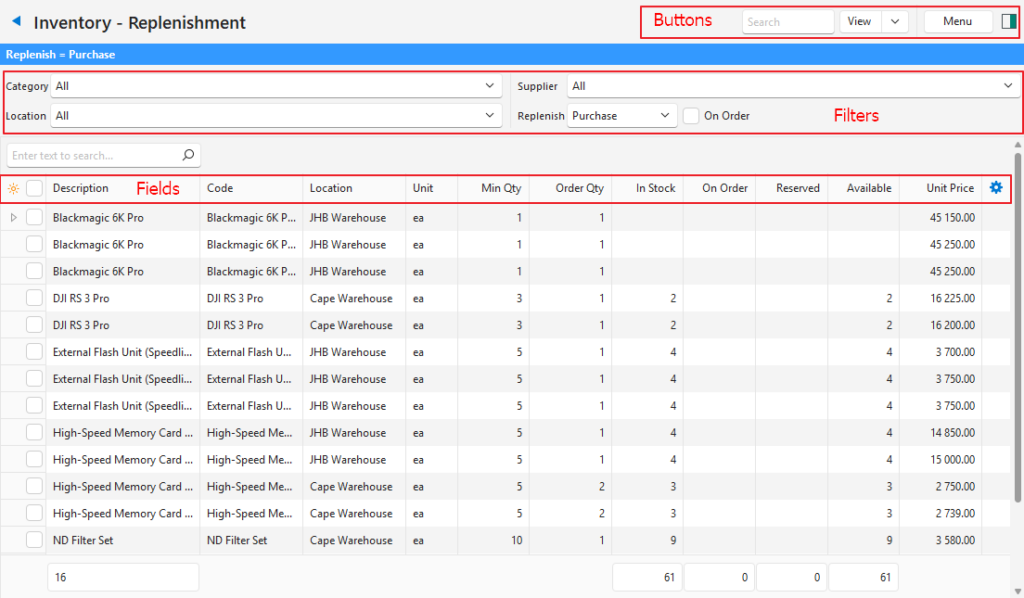
Buttons Explained
| Button | Description |
|---|---|
| View | Generates a list of items as per the selected data filters. |
| Arrow on View | Reset Data Filters: Clears the filters. |
| Menu | Layout |
Filters Explained
| Filter | Description |
|---|---|
| Category | A dropdown list of Categories to show items for all the categories or a specific category. A main category can be selected, which includes all the subcategories. Alternatively, a subcategory can be selected which displays only items in that subcategory. |
| Location | A dropdown list of all the locations to select one or all. |
| Supplier | A dropdown list of suppliers to show items for all the suppliers or a specific supplier. |
| Replenish | Displays only inventory items that must be replenished. Provides a dropdown list with these options: – Produce: Only displays Assembly (ASM) Items with a Cost Price. Changes the Unit filter to Costing. – Purchase: Only displays material items with a Supplier Price. Includes all Material types, including ASM (e.g. some items can be purchased or produced). All the Supplier Prices linked to the Item are displayed. Changes the Unit filter to Purchase. – Transfer: Displays inventory that is stored at multiple locations and must be transferred between these locations (e.g. from a warehouse to a store). Applies to Material Items (including Assemblies) that are linked to Inventory and have a Cost Price. |
| On Order | Checkbox. If checked, only displays items that have been ordered (i.e. purchase order created, but the inventory has not yet been received). |
Fields Explained
| Field | Description |
|---|---|
| Field Chooser (*) | Allows users to add or remove columns. |
| ID | The system-generated number allocated to the entry. |
| Item ID | The system-generated number allocated to the item. |
| Location ID | The system-generated number allocated to the location. |
| Status (Item) | The Item’s status. |
| Description | The item’s description. |
| Code | The item’s code. |
| Categories | The item’s Categories. |
| Status (Location) | The Location’s status. |
| Location | The location’s name. |
| Supplier | Supplier |
| Base Unit | The item’s Base Unit. |
| Unit | The entry’s unit. |
| Min Qty | The minimum quantity that should be on hand. |
| Order Qty | The quantity that should be ordered. |
| In stock | The quantity in stock. |
| On Order | The quantity that has been ordered but not yet received. |
| Reserved | The quantity that is reserved for orders. |
| Available | The quantity that is available. |
| Unit Price | The item’s unit price for the displayed unit. If items are Purchased: The unit price is the Supplier Price. If items are Produced: The unit price is the Cost Price. |
| Created | The date on which the item was created. |
| Updated | The date on which the item was updated. |
| Updated By | The User who last updated the item. |
| Last Order | The code and number of the last order placed. |
| Last Order Date | The date of the last order. |
| Widget | A submenu, which can also be accessed by right clicking the entry. Includes these functions: – Open Linked Item: Opens the linked item’s record. – Open Last Order: Opens the last order transaction (e.g. Purchase or Work Order). |
Learn More
- Item Extension Types: Explains the types of items that are available.
- Item Prices Explained: Explains the various prices and how they are calculated and applied to transactions.
- Item Creation and Editing Interface: Explains the interface from which items are created.
- Item Creation and Editing Tutorials: These tutorials explain how to create items.
- Item List Views Interface: Explains the various interfaces from which a list of items can be viewed.
- Item List Views Tutorials: These tutorials explain the various reports (List Views) and functions available when viewing item lists.
- Item Categories: Explains what categories are, the interface, and how to use them.
- Item Attributes: Explains the item attributes that are available, their purpose, and how to use them.
- Item Summary: Explains the item summary sections and how to use the functions available from the summary.
- Inventory Terms and Information: Explains the inventory terms and settings used.
- Inventory Recording Methods: Explains inventory recording methods like the perpetual and periodic methods.
- Inventory and Transaction Types: Explains how inventory integrates with transactions and how the Resolve function is used.
- Inventory Replenishment Tutorials: Explains how to activate and use the inventory-replenishment features.