
Positions
In QuickEasy BOS, you can create contact information for your staff and include information such as their Job Positions. You can also use these positions to identify Customer and Supplier’s staff members.
Navigation: Main Menu > Contacts/Entities/Customers/Suppliers > Menu (button) > Edit Positions
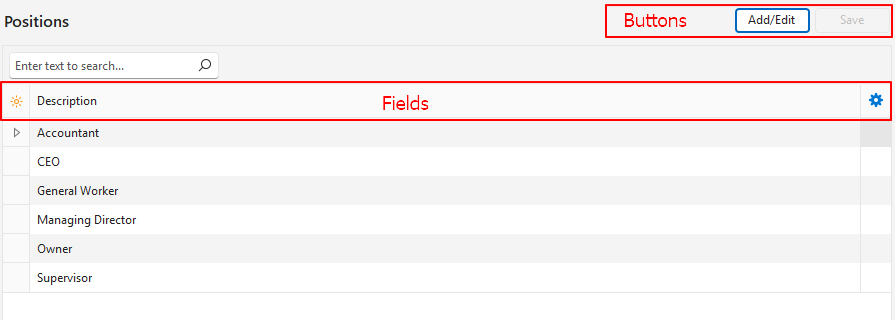
How to Create Job Positions
- Navigate to Edit Positions.
- Click Add/Edit (button) if it is not blue.
- Click anywhere in the top row where it shows: Click here to add a new row.
- Type the name of the position in the Description column.
- Click Save (button).
How to Edit Job Positions
- Navigate to Edit Positions.
- Click Add/Edit (button) if it is not blue.
- Overtype or edit any of the positions.
- Click Save (button).
How to Delete Job Positions
- Navigate to Edit Positions.
- Click Add/Edit (button) if it is not blue.
- Click the last column next to the position you want to delete to expose the X.
- Click the X and confirm the deletion.
Learn More
- Contacts Addresses View: Explains the interface for viewing a list of contacts with address details.
- Contacts Default View: Explains the default display of a list of contacts.
- Contacts Edit View: Explains the interface from which contacts are created.
- Contacts Tutorials Creating and Editing: These tutorials explain how to create and edit contacts.
- Contacts Tutorials Viewing: These tutorials explain the different views and related functions that are available for contacts.
- Customer Records List and Edit Views: Explains the interface to view a list of customers and to create customer records.
- Customer Records Tutorials: These tutorials explain how to display customer lists and how to create, edit, and delete customer records.
- Supplier Records List and Edit Views: Explains the interfaces from which supplier records are displayed and created.
- Supplier Records Tutorials: These tutorials explain how to display supplier lists, and how to create and edit supplier records.
- Billing Methods: Explains the billing methods’ interface and how to create and edit billing methods.
- Contact Categories: Explains what groups are and how to use them.
- Credit Terms: Explains the interface for credit terms and provides tutorials on how to create them.