- Home
- Knowledge Base
- Contacts
- Billing Methods
Billing Methods
Billing Methods refer to the different ways businesses charge customers for their products or services (e.g. EFT, debit order, cash).
The same set of Billing Methods is shared between Customers and Suppliers.
Navigation: Main Menu > Setup > Customers/Suppliers/Contacts > Menu (button) > Edit Billing Methods
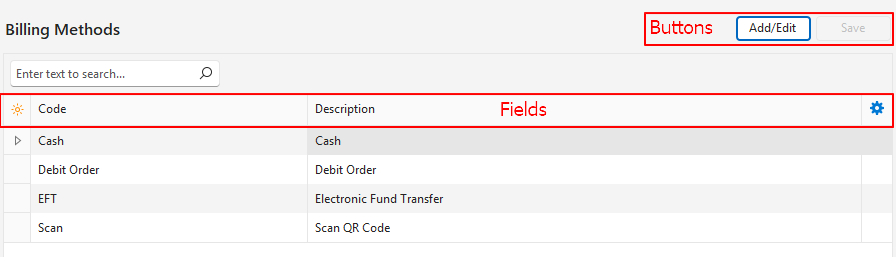
Interface

Buttons Explained
| Button | Description |
|---|---|
| Add/Edit | Allows Users to edit the entry. |
| Save | Saves any changes. |
Fields Explained
| Field | Description |
|---|---|
| Field Chooser (*) | Allows users to add or remove columns. |
| ID | The system-generated number for the entry. |
| Code | The Code for the billing method. This should be a meaningful abbreviation of the full description (e.g. EFT). |
| Description | A Description of the billing method (e.g. Electronic Funds Transfer). |
| Widget | Allows users to delete the entry (click the last column to display an X, and click the X to delete the entry). |
Tutorials
These tutorials explain how to create and edit Billing Methods.
How to Create a Billing Method
- Navigate to Edit Billing Methods.
- Click Add/Edit (button).
- Click anywhere in the top row where it shows: Click here to add a new row.
- Fill in the details as follows:
- Code = Type an abbreviation for the billing method (e.g. EFT).
- Description = Type a description for the billing method (e.g. Electronic Funds Transfer).
- Click Save (button).
- Close the popup with the X in the corner.
How to Edit a Billing Method
- Navigate to Edit Billing Methods.
- Click Add/Edit (button).
- Click any field and edit the text.
- Click Save (button).
- Close the popup with the X in the corner.
How to Delete a Billing Method
Billing methods that have been added to contacts cannot be deleted unless they are removed from the applicable contacts.
- Navigate to Edit Billing Methods.
- Click the last column in the row next to the billing method you want to delete.
- Click the X.
- Confirm the deletion on the popup.
Learn More
- Contacts Addresses View: Explains the interface for viewing a list of contacts with address details.
- Contacts Default View: Explains the default display of a list of contacts.
- Contacts Edit View: Explains the interface from which contacts are created.
- Contacts Tutorials Creating and Editing: These tutorials explain how to create and edit contacts.
- Contacts Tutorials Viewing: These tutorials explain the different views and related functions that are available for contacts.
- Customer Records List and Edit Views: Explains the interface to view a list of customers and to create customer records.
- Customer Records Tutorials: These tutorials explain how to display customer lists and how to create, edit, and delete customer records.
- Supplier Records List and Edit Views: Explains the interfaces from which supplier records are displayed and created.
- Supplier Records Tutorials: These tutorials explain how to display supplier lists, and how to create and edit supplier records.
- Contact Categories: Explains what groups are and how to use them.
- Credit Terms: Explains the interface for credit terms and provides tutorials on how to create them.
- Positions: These tutorials explain how to create, edit, and delete job positions.