
Using Point of Sale Interface
Point of Sale (PoS) is a digital system that enables businesses to complete sales transactions efficiently and accurately. It typically combines hardware—such as a register, barcode scanner, or card reader—with software that records sales, processes payments, and manages inventory. Modern POS systems such as QuickEasy BOS go beyond simple transactions by offering features like real-time reporting, customer management, and integration with accounting tools.
The PoS module is QuickEasy BOS provides for multiple tills and users. The system can also be used to manage stock transfers from one till or branch to another.
Navigation: Main Menu > Open (PoS)
Interface Explained
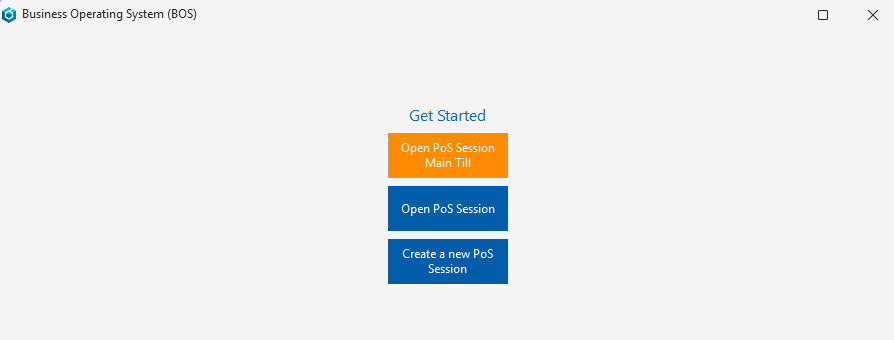
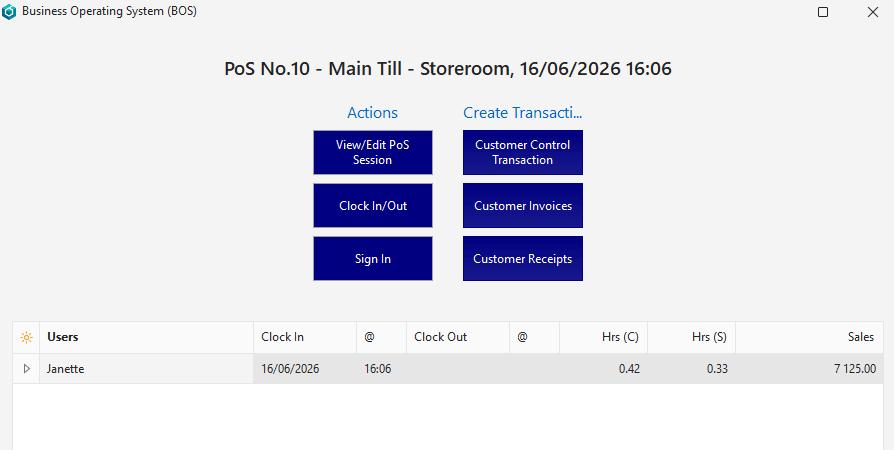
Tile Menu Buttons Explained
- Users are prompted to log in after clicking a tile.
- If a PoS session is open and has transactions, the till cannot be changed. The session must first be closed.
| Button | Description |
|---|---|
| First Screen: | Displayed when BOS is started. |
| Open POS Session – Name of Till – | The till is remembered from the last session. This option allows you to continue using the same till. The button is disabled if the till was cleared, or no till was saved (i.e. the person had not yet used PoS). |
| Open POS Session | Displays a list of all the active PoS Sessions, including the default session, for selection. |
| Create a New POS Session | Creates a new POS Session. |
| Second Screen: | Displayed after an option is selected from the first screen. |
| View/Edit POS Session | Opens the till session that was selected on the first screen. |
| Clock In/Out | Clocks the user in or out. Users are automatically clocked in when they open a till session. When a user clocks in, all the other active clock-in records for that user are clocked out with a note. For example, if someone switches tills and forgot to clock out of the old till. Users are also clocked out by closing a till session from the till interface. |
| Sign In | Signs the user into a till session. Users are automatically signed in when tey create transactions and signed out when they stop creating transactions. |
| Create Transactions | Creates a tile button for all the transactions that have PoS enabled. Normal user-access rights apply to these transactions. |
Fields Explained: Till Session
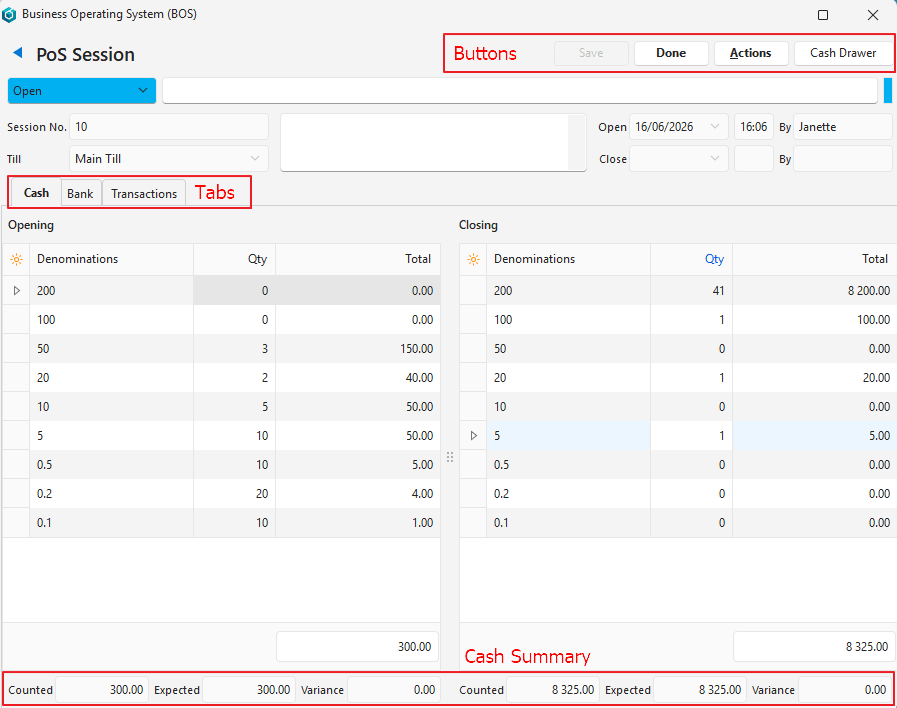
Buttons Explained
| Button | Description |
|---|---|
| Save | Saves any changes |
| Done | Should be clicked after the cash has been counted. Open: Fixes the count so it can no longer be edited and starts the session. Close: Closes the session and logs all the users out. Closes QuickEasy BOS. |
| Actions | Delete PoS Session: Deletes the till session if it is pending and the user has the necessary rights. Refresh: Updates the display with changes made by other users. |
| Cash Drawer | Opens the cash drawer if one is connected by a cable. This feature requires the cash drawer to be setup as a printer and when a receipt is printed, the drawer should open. It was tested using a RJ11 cable. If a cash drawer is not linked, clicking the button does nothing. |
Header Explained
| Field | Description |
|---|---|
| Status | A dropdown list of statuses. – The statuses can be manually changed by users who have Admin View rights. – The statuses are automatically changed when Done (button) is clicked and confirmed. – A status cannot be changed to Cancelled if transactions exist. If no transactions exist and the status is changed to cancelled, all the clock in and sign in records are also cancelled. |
| Status Note | A field to type a note regarding the status. |
| Session No. | The system-generated number allocated to the session. |
| Till | The name of the till if a session is active. A dropdown list from which a till can be selected if a session is started. Click Save (button) after selecting a till to populate the values. |
| Note | A block to type a note. |
| Open | The date and time that the till was opened. |
| By | The user who opened the till. |
| Close | The date and time that the till was closed. |
| By | The user who closed the till. |
Cash (tab) Explained
The tab is divided into two sections: The opening balances are on the left and the closing balances are on the right.
| Fields | Description |
|---|---|
| Field Chooser (*) | Used to add or remove columns (fields). |
| ID | The system-generated number allocated to the entry. |
| Denominations | The denominations that should be counted. The opening quantities are on the left and the closing quantities are on the right. The quantities that can be edited are determined by the status. |
| Qty | A field to enter the counted quantity of each denomination. |
| Total | The value of the counted quantity. |
| Counted (tally) | Adds the counted amount. |
| Expected (tally) | The expected cash on hand (i.e. balance from previous session). |
| Variance (tally) | The difference between the Counted and Expected amounts. |
Bank (tab) Explained
This tab lists all the bank transactions that were created from PoS.
| Field | Description |
|---|---|
| Field Chooser (*) | Used to add or remove columns (fields). |
| ID | The name of the Cash Account. The system-generated number allocated to the entry. |
| Trans No. | The PoS transaction number. The number of the transaction outside of the PoS system. |
| Total | The total amount on the transaction. |
| User | The user who created the transaction. |
| @ | The time of the transaction. |
| Widget | A submenu with these options: – Expand – Collapse – Open Transaction (only applies if a transaction is clicked) |
Transactions (tab) Explained
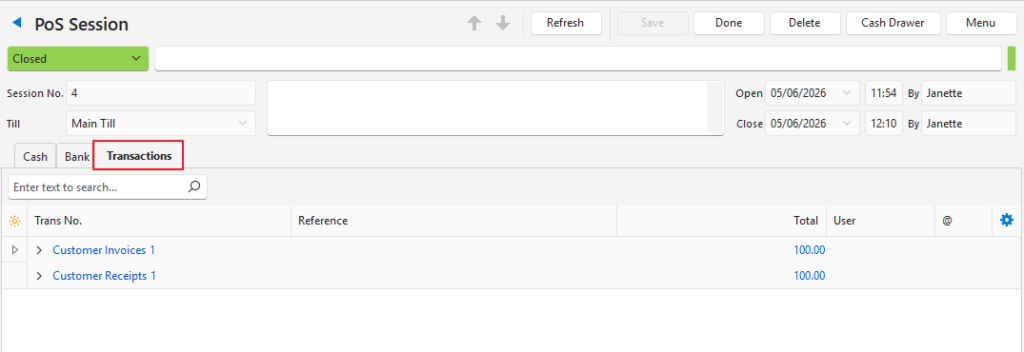
| Field | Description |
|---|---|
| Field Chooser (*) | Used to add or remove columns (fields). |
| ID | The name of the Transaction Type. The system-generated number allocated to the entry. |
| Trans No. | The PoS transaction number. The number of the transaction outside of the PoS system. |
| Reference | The transaction’s reference. |
| Total | The total amount of the transaction. |
| User | The user who recorded the transaction. |
| Time | The time of the transaction. |
| Widget | A submenu with these options: – Expand – Collapse – Open Transaction (only applies if a transaction is clicked) |
Learn More
- Point of Sale Setup Interface: Explains the point-of-sale setup interface.
- Point of Sale Setup Tutorials: These tutorials explain how to setup the point-of-sale system.
- Point of Sale Tutorials: These tutorials explain how to use the point-of-sale interface.
- Point of Sale Reports: Explains the point-of-sale summary interface.