
Customer Detailed Ledger
The Customer Detailed Ledger displays all the transactions that involved a specific customer for the selected period.
In QuickEasy BOS, this ledger is linked to the Customer Age Analysis and is accessed from there.
Navigation: Main Menu > Accounting > Customer Age Analysis > Menu (button) > Detailed Ledger
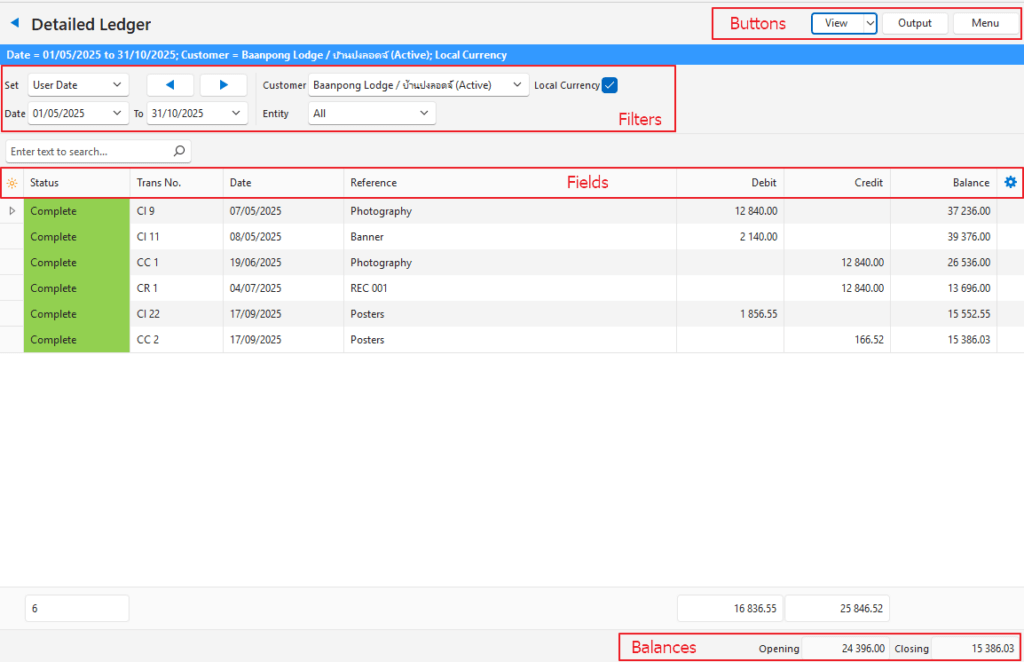
Buttons Explained
| Button | Description |
|---|---|
| View | Generates a list of entries as per the selected data filters. |
| Arrow on View Button | Arrow on View Button > Reset Data Filter. |
| Output | Reports can be printed, previewed, or emailed if Output Templates are created and linked. Allows the display to be exported in .xlsx, .csv, or .htm format. |
| Menu | Views – Age Analysis – Detailed Ledger – Transactions Settings – User Access Layout |
Filters Explained
| Filter | Description |
|---|---|
| Set | Allows users to select a date from the dropdown list (e.g. No Date, Today, This year). |
| Navigational Arrows | Adjusts the dates in the direction of the arrow. |
| Date … to … | Allows users to enter their own dates. |
| Customer | A dropdown list of customers for selection. |
| Entity | A dropdown list of entities for selection. |
| Local Currency | A checkbox. If checked foreign currency transactions are converted and displayed in the local currency. |
Fields Explained
| Field | Description |
|---|---|
| Field Chooser (*) | Allows users to add or remove columns. |
| Trans ID | The system-generated number for the transaction. |
| Status | The colour-coded status of the transaction. |
| Trans | The transaction type’s code. |
| No. | The transaction number. |
| Trans No. | The transaction type’s code (e.g. SI for Supplier Invoice) and number. Combines the Trans and No. fields and is displayed by default. |
| Date | The date of the transaction. |
| Entity (Reg) | The Registered Entity to which the transaction is allocated. |
| Entity | The entity selected for the transaction which can be a till, branch, or registered entity. |
| Reference | The reference entered on the transaction. |
| Currency | The transaction’s currency. Only displayed if the customer is invoiced in a foreign currency. |
| Debit | The amount that was debited for the specific line item. |
| Credit | The amount that was credited for the specific line item. |
| Allocated | The amount that has been allocated (e.g. customer invoices allocated to payments). |
| Outstanding | The amount that is still outstanding. |
| Balance | The running total (balance) on the account. |
| Widget | A submenu that can be accessed by right clicking the line: – View/Edit Allocation: Opens the allocation for the selected entry. If the transaction can be edited, the allocation can be edited. If the transaction is read-only, the allocation is also read only. – Open Transaction: Opens the original transaction. |
Footer Explained
| Field | Description |
|---|---|
| Opening | The opening balance at the start of the selected period. |
| Closing | The closing balance at the end of the selected period. |
Learn More
- Customer Age Analysis and Ledger Tutorials: These tutorials explain how to display the Customer Age Analysis and Customer Ledger and how to send Customer Statements.
- Customer Age Analysis and Statements: Explains the Customer Age Analysis interface an provides a sample Customer Statement.
- Customer Age Analysis – Transactions: Explains the interface to view customer transactions grouped per ageing period.
- Customer Records List and Edit Views: Explains the interface to view a list of customers and to create customer records.
- Customer Records Tutorials: These tutorials explain how to display customer lists and how to create, edit, and delete customer records.
- Price Lists: Explains how price lists work and provides tutorials on using price lists.