
Customer Age Analysis – Transactions
The Customer Age Analysis (CAA), also known as Debtors Age Analysis, is used by organisations to manage collections. The age analysis has columns that are divided into date ranges of current, 30, 60, 90, 120, 150, and 180+ days. These date ranges are based on the calendar month and not necessarily the number of days in the month.
Customer Age Analysis – Transactions displays more information than the Customer Age Analysis and helps to identify the specific outstanding transactions if allocations are used. However, the date columns only go up to 150+ days.
Navigation Example: Main Menu > Accounting > Customer Age Analysis > Menu (button) > Transactions
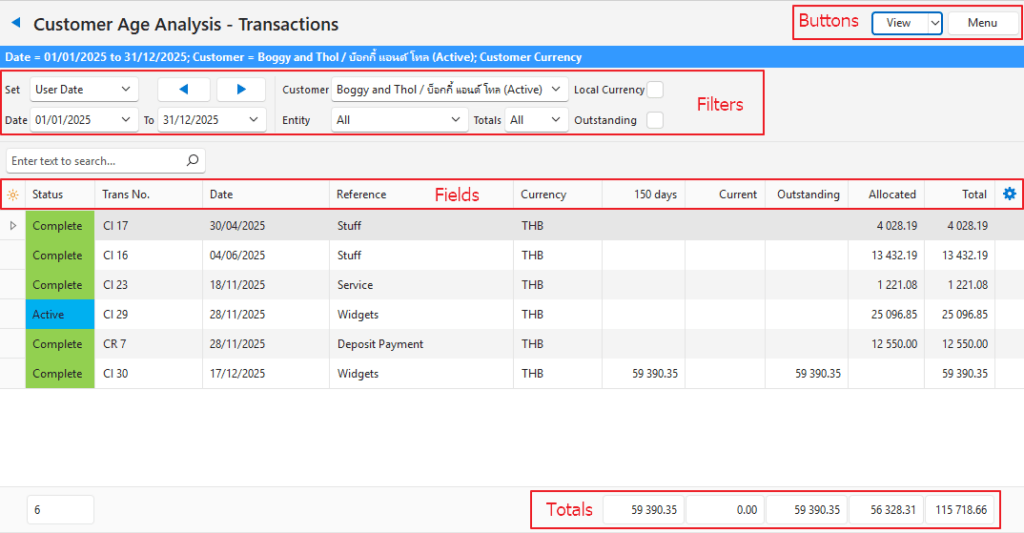
Buttons Explained
| Button | Description |
|---|---|
| View | Generates a list of entries as per the selected data filters. |
| Arrow on View Button | Reset Data Filter: Resets all the data filters. |
| Menu | Views – Age Analysis – Detailed Ledger – Transactions Settings – User Access Layout |
Filters Explained
| Filter | Description |
|---|---|
| Set | Allows users to select a date from the dropdown list (e.g. No Date, Today, This year). |
| Navigational Arrows | Adjusts the date in the direction of the arrow. |
| Date … to … | Allows users to set their own Dates (based on the selection under Set). The To date defaults to today. |
| Customer | A dropdown list of customers to select one. |
| Entity | A dropdown list of Entities to select All or a specific Entity. |
| Totals | A dropdown list to only display record with Debit or Credit balances or to display All records. |
| Local Currency | Checkbox. If checked converts all the values to the local currency. |
| Outstanding | Checkbox. If checked only outstanding transactions are displayed. |
Fields Explained
The duplicate columns Trans, No. and Trans No. are provided to allow for various grouping and filtering options.
| Field | Description |
|---|---|
| ID | The system-generated number for the entry. |
| Status | The transaction’s status. |
| Trans | The transaction type’s code. |
| No. | The transaction type’s number. |
| Trans No. | The transaction type’s code and number. |
| Date | The transaction’s date. |
| Reference | The transaction’s reference. |
| Currency | The transaction’s currency. |
| Entity (Reg) | The Registered Entity that the transaction is allocated to. |
| Entity | The entity selected for the transaction which can be a registered entity, till, or branch. |
| 150+ days | Transactions that are older than 5 months calculated from the To date. |
| 150 days | Transactions that are between 4 and 5 months old calculated from the To date. |
| 120 days | Transactions that are between 3 and 4 months old calculated from the To date. |
| 90 days | Transactions that are between 2 and 3 months old calculated from the To date. |
| 60 days | Transactions that are between 1 and 2 months old calculated from the To date. |
| 30 days | Transactions that are older than 1 month calculated from the To date. |
| Current | Transactions that happened in the current month of the To date. |
| Outstanding | Transactions that are not allocated (e.g. unpaid invoices, or receipts that were not allocated to invoices like deposit payments). |
| Allocated | Transactions that are fully allocated. |
| Total | The total amount on the transaction. |
| Widget | A submenu that can also be accessed by right clicking the entry: – Open Transactions: Opens the actual transaction. |
Footer Explained
| Field | Description |
|---|---|
| 30-150+ day columns | The total of the transactions that appear in those columns. |
| Current | The total of transactions that are current. |
| Outstanding | The unallocated transactions. This is the amount that the customer owes or if negative, that is owed to a customer (e.g. if they overpaid or paid a deposit). |
| Allocated | Transactions that have been fully allocated. If the Outstanding filter checkbox is checked, these transactions are hidden. |
| Total | A running total of all the transactions. |
Learn More
- Customer Age Analysis and Ledger Tutorials: These tutorials explain how to display the Customer Age Analysis and Customer Ledger and how to send Customer Statements.
- Customer Age Analysis and Statements: Explains the Customer Age Analysis interface an provides a sample Customer Statement.
- Customer Detailed Ledger: Explains the Customer Detailed Ledger interface.
- Customer Records List and Edit Views: Explains the interface to view a list of customers and to create customer records.
- Customer Records Tutorials: These tutorials explain how to display customer lists and how to create, edit, and delete customer records.
- Price Lists: Explains how price lists work and provides tutorials on using price lists.