Supplier Age Analysis and Remittance Advices
The Supplier Age Analysis (CAA), also known as Creditors Age Analysis, is used by organisations to manage collections. The age analysis has columns that are divided into date ranges of current, 30, 60, 90, 120, and 180+ days. These date ranges are based on the calendar month and not necessarily the number of days in the month.
Credit limits are shown on the age analysis and there is a setting to allow Work in Progress to be shown.
A transaction appears on the age analysis once the Header Status is in an accounting status (the accounting checkbox is checked for that status).
The Supplier Detailed Ledger can be accessed from the supplier age analysis but is a separate module.
Navigation: Main Menu > Accounting > Supplier Age Analysis
Settings
These settings affect which transaction totals are included on the Supplier Age Analysis.
| Setting | Setting Name | Description |
|---|---|---|
| Transaction Setting > Settings (tab) | Accounting > Enable Accounting | Supplier Invoices and Debit Notes must have accounting enabled to appear on the age analysis and ledger. |
| Transaction Setting > Settings (tab) | Accounting > Sum Active Transactions to Work in Progress in Supplier Age Analysis | The setting is added to applicable Transaction Types (e.g. Purchase Orders). The checkbox in the Value column must be checked. If a transaction has a Status that falls in the Active group, the transaction is shown on the Supplier Age Analysis as WIP. This feature helps organisations manage their credit limits. The setting should not be checked for transactions that automatically appear on the Supplier Age Analysis (e.g. Supplier Invoices, Debit Notes) because the amounts will be duplicated. |
| Transaction Setting > Status (tab) | Accounting | Transactions are only included in the Supplier Age Analysis when they are in an Accounting status (i.e. the checkbox in the Accounting column is checked for the applicable Status). |
Interface Explained
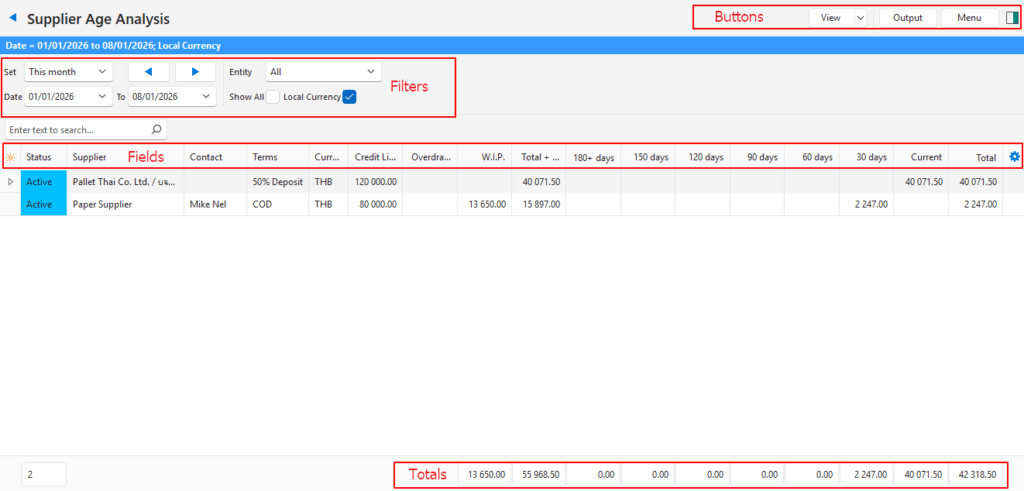
Buttons Explained
| Button | Description |
|---|---|
| View | Generates a list of entries as per the selected data filters. |
| Arrow on View Button | Reset Data Filter > Resets all the data filters. |
| Output | Prints, previews, or emails reports if Output Templates are created. Supplier Remittance Advices are normally one of the templates and are emailed from the age analysis. Supplier ledgers have different output options. |
| Menu | Views – Age Analysis – Detailed Ledger Settings – User Access Layout |
Filters Explained
- The Start Date applies to remittance advices and the ledger. It has no effect on the age analysis.
- The End Date is the date for which the age analysis is generated.
- The age analysis dates are transferred to the ledger. However, any changes to the dates on the ledger are not transferred to the age analysis.
| Filter | Description |
|---|---|
| Set | Allows users to select a date from the dropdown list (e.g. No Date, Today, This year). |
| Navigational Arrows | Adjusts the date forwards or backwards. |
| Date … to … | Allows users to set their own Dates (based on the selection under Set). The To date defaults to today. |
| Entity | A dropdown list of Entities to select All or a specific Entity. |
| Show All | Checkbox. If checked shows all the suppliers, even those with zero balances. |
| Local Currency | Checkbox. If checked converts all the values to local currency. |
Fields Explained
| Field | Description |
|---|---|
| ID | The system-generated number for the entry. |
| Status | The supplier’s Status. |
| Supplier | The supplier’s Name |
| Code | The supplier’s Code. |
| Contact | The supplier’s Accounting contact person. |
| Terms | The supplier’s Terms. |
| Currency | The supplier’s Currency. |
| Credit Limit | The supplier’s Credit Limit. |
| Overdrawn | The sum of WIP and Total Amount Outstanding that exceeds the Credit Limit. |
| W.I.P. | The total value of Work in Progress as per the setting. |
| Total + W.I.P. | The total amount outstanding added to the work in progress. |
| 180+ days | The amount that has been outstanding for 6 months or more based on the To date. |
| 150 days | The amount that has been outstanding for 5 months based on the To date. |
| 120 days | The amount that has been outstanding for 4 months based on the To date. |
| 90 days | The amount that has been outstanding for 3 months based on the To date. |
| 60 days | The amount that has been outstanding for 2 months based on the To date. |
| 30 days | The amount that has been outstanding for 1 month based on the To date. |
| Current | The amount that represents transactions in the current month. |
| Total | The Total amount outstanding. |
| Widget | A submenu, which can also be accessed by right clicking the entry, with the following functions: – Open Supplier: Opens the supplier’s record. – Open Detailed Ledger: Opens the supplier’s detailed ledger. |
Remittance Advices
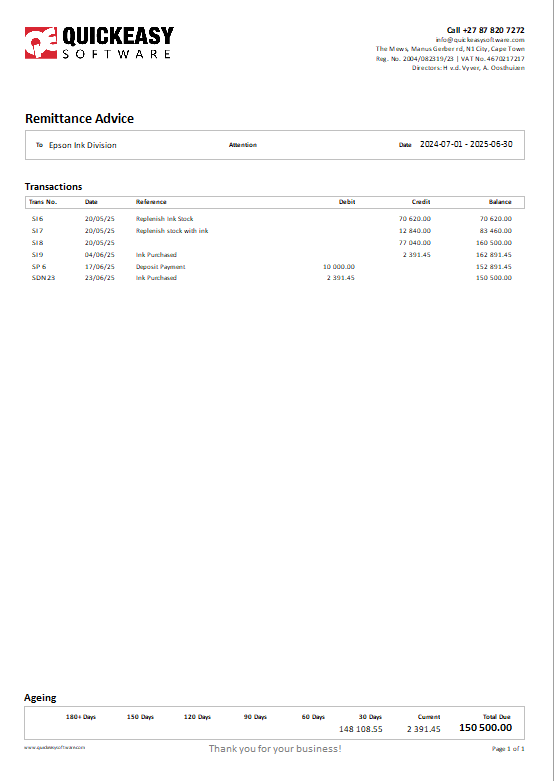
- Below is an example of the included template.
- A Remittance Advice is generated by clicking Output (button).
- The template can be added to Supplier Invoices where it will only include a single invoice.
- If added to the Supplier Age Analysis, it shows all the transactions as per the selected date ranges.
- When generating remittance advices, an Entity must be selected because the heading, bank details and logo are picked up from the entity’s records.
- Currently remittance advices must be generated one at a time.