
Mobile App Dashboard Interface and Tutorials
The Mobile App is a browser-based app that integrates to the desktop version of QuickEasy BOS.
It has three main functions:
- Allowing business owners and managers to view their key metrics from anywhere in the world.
- Allowing users to record their timekeeping, travel times, and distances from their mobile phones.
- Allowing reps to manage their customer records from anywhere.
To create dashboards (i.e. to create metrics for the mobile app), users must have admin rights to access the Users setup page. However, dashboards can be copied to or created for other users.
Dashboard
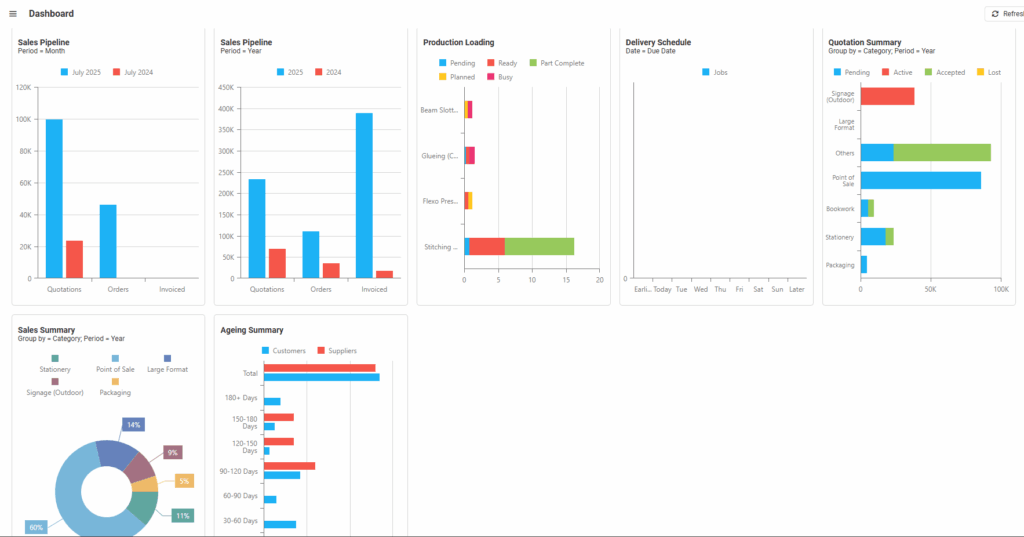
- Displays the dashboards / metrics as selected under Users’ setup.
- Each dashboard includes the name of the dashboard and the applicable filters.
- On a desktop, holding the mouse cursor over the fields displays additional information (e.g. monetary values).
- On a mobile device, the fields can be tapped to display additional information (e.g. monetary values).
Dashboard Tutorials
How to View the Values Depicted by Graphs
- Login to the mobile app.
- Click Dashboard (button).
- Mobile Device: Tap any of the graphics to see the value.
- Desktop: Hold your mouse cursor over any of the graphs to see the value.
How to Add Metrics
- Metrics (additional dashboards) can only be added from the desktop app.
- See Dashboard Tutorials for information on how to create dashboards.
- See Dashboard Interface for a list of the available metrics.
Learn More
- Dashboard Interface (KPIs) BOS Desktop: Explains the interface from which metrics are chosen to display on the mobile app. Lists the available indicators (metrics).
- Dashboard Tutorials (KPIs) BOS Desktop: These tutorials explain how to select key performance indicators to display on the mobile app.
- Mobile App CRM Interface and Tutorials: Explains how to use the customer relationship features and context menus on the mobile app.
- Mobile App General Functions Tutorials: Explains the basics of using the mobile app.
- Mobile App Interface: Explains the mobile app’s menu and main interface.
- Mobile App Timekeeping Interface: Explains the interface that is used to record timekeeping on the mobile app.
- Mobile App Timekeeping Tutorials: These tutorials explain how to use the timekeeping and related functions on the mobile app.

