
Email Edit View
- QuickEasy BOS includes features to send emails.
- Forms (e.g. Customer Invoices and Statements) can be emailed directly from the transactions or reports.
- Email Templates can be customised to include personalisation and other features.
- Once set up, documents can be emailed from the screens on which they are viewed by clicking Output (button). These emails are placed in the Outbox, from where they can be edited or sent.
- Emails is a menu option which can be included in any menu.
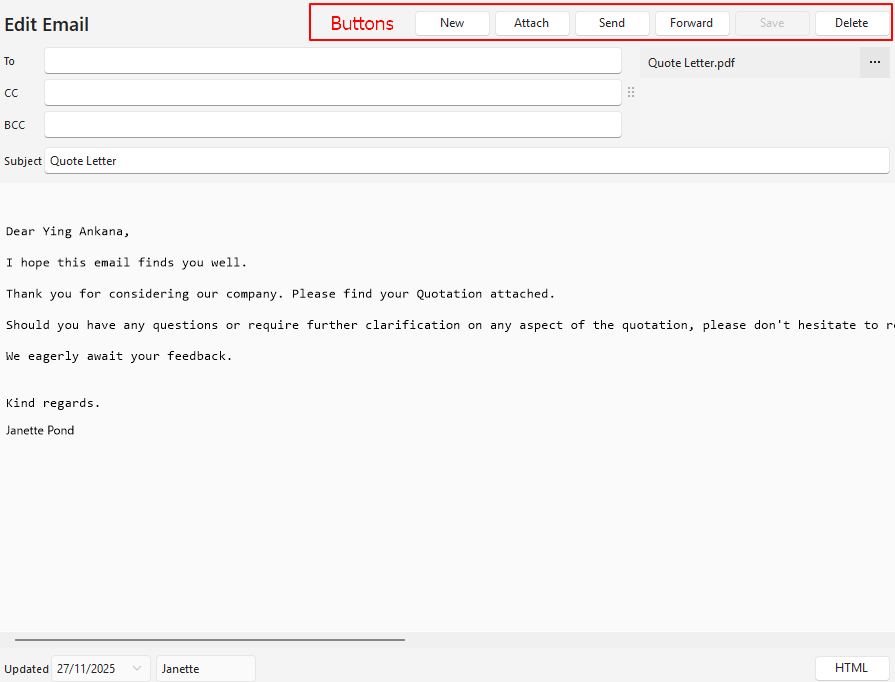
Buttons Explained
| Button | Description |
|---|---|
| New | Creates a new email. |
| Attach | Allows users to add an attachment. |
| Send | Sends the email. Emails are sent using HTTP and AWS SES – One Region. Once an email with an attachment is sent, the attachment is no longer available. |
| Forward | Forwards the email. |
| Save | Saves any changes. |
| Delete | Deletes the email. |
Fields Explained
| Field | Description |
|---|---|
| To | A field for users to select an email address from the dropdown list. The field is prefilled with the contact person’s email address if a transaction is emailed. The main recipient of the email. |
| CC | A field for users to select an email address from the dropdown list. The person the email is copied to. |
| BCC | A field for users to select an email address from the dropdown list. The person the email is secretly copied to (i.e. without exposing their email address). |
| Attachment section | Lists the attachments. This section only appears if the email contains attachments. Click the ellipses (…) to Open Attachment or Delete Attachment. Once sent, attachments are no longer available. |
| Subject | A short description of what the email is about. |
| Email Body | A block in which to type an email. |
HTML Explained
| Button | Description |
|---|---|
| HTML | Click HTML to open the HTML editor. Click HTML again to return to the text view. |
| Format | Formats the HTML to make it easier to read. |

Learn More
- Email List View: Explains the interface that lists all the emails that have been created.
- Email Templates: Explains the interface from which email templates can be created. Lists all the available data fields.
- Form Designer – Reportbuilder Tutorials: These tutorials explain how to create or edit a template (form).
- Form Designer Interface: Explains the commonly used features for the Form Designer.
- Output Button: Explains the Output button that is available on most views.
- Output Template Tutorials: These tutorials explain how to add templates to transaction types and other modules.
- Output Templates Module: Explains the Output Templates interface.