
Service Types List View Interface
A service manager is a tool used to manage and streamline an organisation’s service management processes. It helps organisations automate and track service requests, incidents, queries, changes, and problems. It includes features for ticketing, management, and reporting. It aims to improve efficiency, reduce downtime, and ensure a higher level of service quality by enabling organisations to manage, prioritise, and resolve issues effectively.
The Service Manager in BOS can also be used to track and follow up on leads and to manage Projects.
A Service Type defines the interface for service tickets. Organisations may have an unlimited number of Service Types.
Navigation: Main Menu > Setup > Service Types
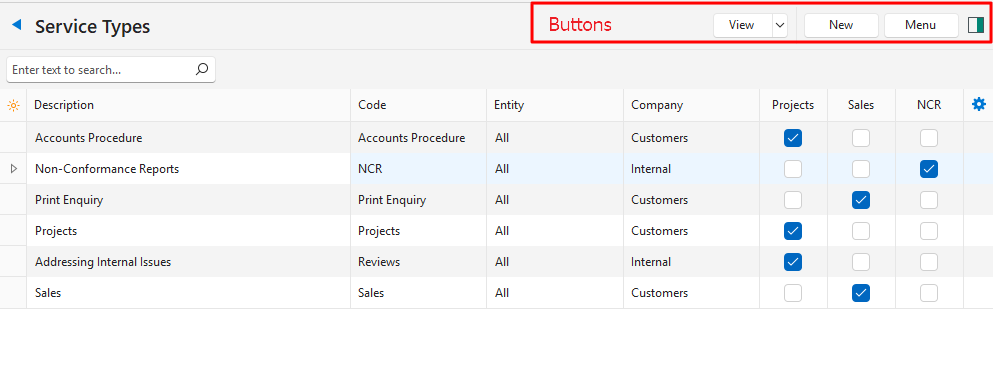
Buttons Explained
| Button | Description |
|---|---|
| View | Displays a list of Service Types. |
| Arrow on View Button | Resets all the Data Filters. |
| New | Creates a new service type. |
| Menu | – Show Notes: If checked, displays notes entered on the Service Type’s header below the entries. – Layout |
Fields Explained
| Field | Description |
|---|---|
| Field Chooser (*) | Allows users to add or remove columns. |
| ID | The system-generated number for the entry. |
| Description | The service type’s description. |
| Code | The brief description of the service type. |
| Entity | The entity in which the service type can be used. |
| Company | Whether the service type uses Customers, Suppliers, or neither. |
| Project | A checkbox. If checked projects are used. |
| Sales | A checkbox. If checked the service type is used to manage sales enquiries. |
| Created | The date on which the service type was created. |
| Updated | The date on which the service type was updated. |
| Updated By | The user who last updated the ticket. |
| NCR | A checkbox. If checked the setting NCR is enabled. |
| Widget | A submenu, which can also be accessed by right clicking the entry, with the following functions: – Edit: Opens the edit interface. – Delete: Deletes the service type if it has not yet been used. – User Access: Sets User Access for the specific Service Type. – Edit Project Templates: Allows the project templates to be edited. |
Learn More
- Non-Conformance Reports (NCRs): Explains how non-conformance reports are integrated into QuickEasy BOS.
- Project Templates List and Edit Views: Explains the Project Templates interface. Projects are part of the service manager.
- Project Templates Tutorials: These tutorials explain how to create Project Templates.
- Service Tickets Edit View Interface: Explains the interface from which service tickets are created.
- Service Tickets List View Interface: Explains the interface for displaying a list of service tickets.
- Service Tickets Tutorials: These tutorials explain how to create and manage service tickets.
- Service Types Edit View Interface: Explains the interface from which Service Types are created. Service Types determine the fields available for service tickets.
- Service Types Tutorials: These tutorials explain how to create and edit Service Types. Service Types determine which fields are available to Service Tickets.