
Languages
- QuickEasy BOS supports multiple languages, alphabets and scripts.
- Users are linked to their preferred language and can toggle between English and their preferred language.
- By default, QuickEasy BOS opens in English. However, once a user has been allocated a language, the application defaults to that language for that user after BOS is restarted.
- If users are allocated a second language, they are also able to select that language in the Mobile App.
- The text is divided into two dictionaries:
- Master dictionary: Contains strings and component names hard coded in the application.
- Local dictionary: Contains strings from data that is captured in the local database (e.g. custom menu templates and status names).
- Before a language is translated, it must be activated internally. Please contact QuickEasy support for assistance.
Navigation: Main Menu > Setup > Language Editor
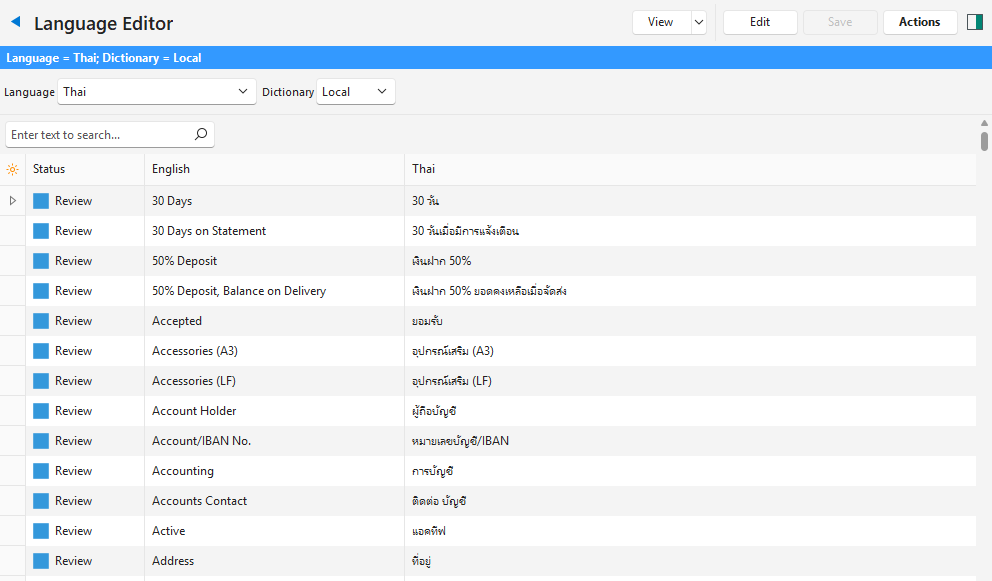
Buttons Explained
| Button | Description |
|---|---|
| View | Generates a list of words and phrases with English in the first column and the selected language in the second column. |
| Arrow on View (button) | Resets the Data Filter to the first language alphabetically, and the Local dictionary. |
| Edit | Allows the records to be edited. |
| Save | Saves any changes. |
| Actions when Local Dictionary selected | Batch Update: Allows users to change the Status of multiple records. The status options are Draft, Review, and Ready. Update Dictionary (Local): Adds data strings that were input into the local database. The new data have a Status of Draft. Translate Dictionary (Local): Translates strings from English to the selected language using AI. – The translations can be edited. – Once translated the Status is changed to Review. – Entries with the Ready status are not translated again. |
| Actions when Master Dictionary selected | Batch Update: Allows users to check or uncheck the Override checkbox. Update from Master: Adds/updates the Master Dictionary from the admin database. |
Filters Explained
| Filter | Description |
|---|---|
| Language | A dropdown list of all the assigned languages for users to select one. |
| Dictionary | The available dictionaries: – Local: Displays words and phrases from the Local Dictionary. – Master: Displays words and phrases from the Master Dictionary. |
Fields Explained
| Field | Description |
|---|---|
| Field Chooser (*) | Allows users to add or remove columns. |
| ID | The system-generated number for the entry. |
| Master ID | The system-generated number for the master record. |
| Master (Linked Master) | A checkbox, if checked the field is in the Master Dictionary. |
| Override | A checkbox. If checked users can override the translation and the translation will no longer be updated when using auto-translate functions. This option is only available if a Master Dictionary is selected. |
| Status | A dropdown list for users to select: Draft, Review, or Ready. |
| English | A list of words, phrases, and abbreviations in English. This option is only available if a Local Dictionary is selected. |
| Additional Language | A list of words, phrases, and abbreviations in the additional language. The additional language (e.g. Thai) is displayed. |
| Updated By | The name of the User who last updated the record. |
| Updated | The date on which the record was last updated. |
Learn More
- Language Tutorials: These tutorials explain how to use the language and translation functions.