
Profit‑First Pricing Made Simple: QuickEasy BOS Cost Centres
QuickEasy BOS offers a robust framework for managing the financial aspects of your business operations, including service pricing. Using cost centres as part of an item’s costing is a strategic approach to ensure accurate and competitive pricing.
What is a Cost Centre
A cost centre in QuickEasy BOS refers to a part of a business that does not directly generate revenue but does incur costs. By tracking these costs, you can manage business expenses more effectively and make informed pricing decisions for your services.
You can create and customise an unlimited number of cost centres. For example, each machine, or production department can be set up as a cost centre.
Assign Costs to Cost Centres
Once your cost centres are established, the next step is to assign specific costs to them. This involves:
- Identifying the expenses associated with a particular service.
- Allocating these expenses to the appropriate cost centre from where they are derived or where they impact the most.
QuickEasy BOS simplifies this process by allowing you to add the staff involved in a cost centre and to enter their monthly total cost to the company. The total cost should include staff’s remuneration and benefits.
Next the assets used can be entered and a monthly cost assigned to them. These costs should include maintenance and finance costs, or replacement costs if the machines are paid off.
In addition, you enter the number of hours and weeks worked to calculate a rate over productive hours only.
From this information, QuickEasy BOS calculates an hourly rate for the cost centre. However, if you prefer to set your own hourly rate, you can override the calculated rate and enter your own.
Integrate Cost Centres into Item Costing
Costing Items are like estimates because they include all these components:
- Materials: The raw goods and components used in manufacturing or service delivery.
- Tasks: The labour costs associated with the execution of a project.
- Outwork: Expenses related to external services or subcontracted work.
Integrating cost centres into item costing is crucial for accurately determining the price of a service or outwork. And because a picture paints a thousand words, here is a screenshot of just how easy it is to create costings in QuickEasy BOS.
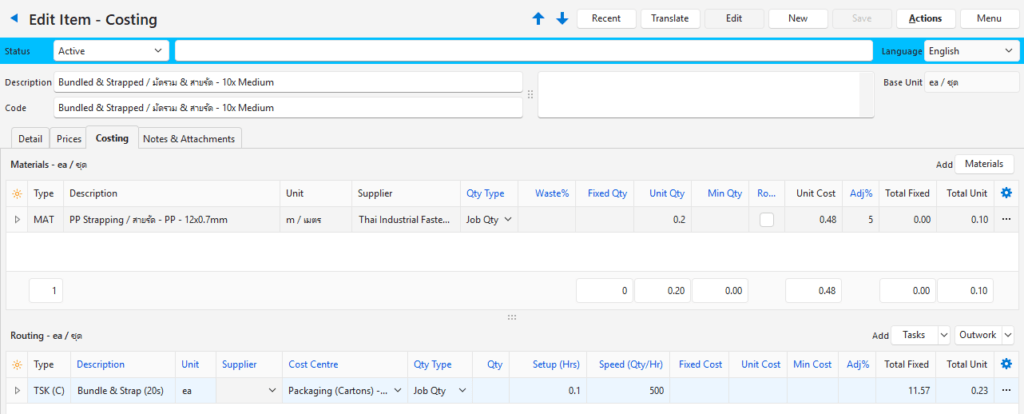
As shown, the cost of a service is linked to a cost centre. The speed of a service, output, and direct costs can all be entered to calculate an exact cost per unit.
This costing is incorporated into quotations and estimates to ensure jobs are costed accurately. Mark-ups in the form of adjustments can be added along the way or only to the final cost price.
Review and Adjust as Necessary
It’s important to periodically review the costs and pricing set in your cost centres. Market conditions, operational efficiencies, or changes in supplier pricing can affect your cost structure and necessitate adjustments to your service pricing.
As cost centre prices are adjusted, the linked costing prices will also be adjusted so your prices are always based on accurate and up-to-date information.
This systematic approach not only simplifies the pricing process but also enhances transparency and control over your business finances.
Conclusion
Using cost centres in QuickEasy BOS allows for a granular approach to managing service costs and setting prices. By understanding and implementing this feature effectively, businesses can ensure their pricing strategies are both competitive and reflective of actual costs, enhancing profitability and operational efficiency.
For more detailed information and guidance, you can visit the QuickEasy BOS knowledge base here.