
Calendar Types Edit View
- QuickEasy BOS helps organisations keep track of transaction items (e.g. tasks to be performed, goods to be made) and project deadlines using calendars.
- Calendars assist in managing resources such as labour, equipment, vehicles, and booking schedules.
- An organisation can have an unlimited number of calendars and customise the settings for each calendar by creating a Calendar Type.
- Once created, a Calendar can be added to any menu.
- User access is set for each calendar separately.
- Calendars can be integrated into Service Tickets to manage project and production tasks and Transactions at an item level.
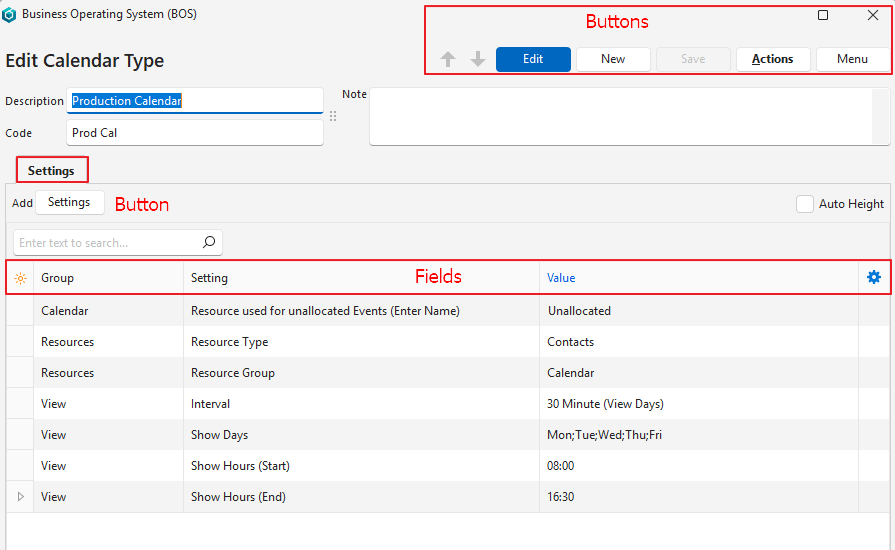
Buttons Explained
| Button | Description |
|---|---|
| Edit | Allows the entry to be edited. Displayed in blue if edit mode is active. |
| New | Creates a new calendar type. |
| Save | Saves any changes. |
| Actions | Delete: Deletes the calendar type. |
| Menu | User Access: Sets user access for the calendar type. Layout |
Header Explained
| Field | Description |
|---|---|
| Description | A field to enter a description for the calendar type. |
| Code | A field to enter a brief description for the calendar type. |
| Note | A field to enter a note about the calendar type. |
Settings (tab) Explained
- Settings are added by clicking Settings (button) next to Add.
- The settings are explained here.
| Field | Description |
|---|---|
| Editor | The system-generated number allocated to the language editor. |
| ID | The system-generated number allocated to the setting. |
| Module ID | The system-generated number for the calendar type. |
| Group | The name of the group. |
| Setting | The name of the setting. |
| Value | An editable field to change the setting’s value. |
| Created | The date on which the setting was added. |
| Updated | The date on which the setting was updated. |
| Updated By | The user who last updated the setting. |
| Widget | A submenu that can also be accessed by right clicking an entry with the following function: – Delete: Removes the setting. If removed, the setting reverts to its default value and can be added again. |
Learn More
- Calendar Tutorials: These tutorials explain how to create and edit calendars. They also explain how to create custom calendar entries.
- Calendar Type Tutorials: These tutorials explain how to create Calendar Types which are the setup steps for calendars.
- Calendar Types List View: Explains the interface for displaying a list of all the Calendar Types that have been created.
- Calendar Types Settings: Explains the settings available to create and customise calendars.
- Calendars and Transactions: Explains how to setup and enter transactions to integrate with calendars.
- Calendars Interface: Explains the interface features when viewing calendars.